Showing posts with label APPS AND SOFTWARE. Show all posts

Friday, May 8, 2015

6 things Android Wear smartwatches can do that the Apple Watch can't

Android-wear-5-1-1-wrist-gestures

Android Wear 5.1.1's new wrist gestures on the LG Watch Urbane.

The "fight of the century" between Manny Pacquiao and Floyd Mayweather Jr. might have been a decidedly snoozy one, but there's another battle coming up worthy of your attention: Apple Watchversus Android Wear.

With the Apple Watch finally on consumer wrists, the wearable war between Apple and Google is finally heating up.

Each wearable platform has its own strengths and weaknesses. Obviously, if you're already deeply invested into the iPhone ecosystem, the Apple Watch is the way to go. And if you're an Android user, Android Wear makes sense. Neither is compatible with one another (although there's a rumor that Google is working on an Android Wear app for iOS).

With the new Android Wear 5.1.1 Wear update rolling out to smartwatches, it's clear the Apple Watch will have some catching up to do to reach feature parity with Android Wear's year head start.

1. Custom watch faces

Android Wear watch faces

Android Wear lets developers create and sell their own custom watch faces.

From the very start, Google's allowed anyone to design and sell their own custom watch faces for Android Wear smartwatches. The Apple Watch, on the other hand, only has 11 watch faces, though they can be customized with "complications," little widget-like bits in each corner.

With Apple rejecting apps that display only the time, it's unlikely the company will allow third parties to design and sell digital watch faces without its official blessing. That's a real disappointment if you're really into customizations.

2. Always-on apps (soon)

To see the time on a smartwatch, you often have to raise your arm up in an exaggerated motion. This is fine if you're walking down the street, but just plain irritating when you're sitting down or want to glance at the time while you're typing.

Many Android Wear watches, including the LG G Watch R, include a feature called "always-on," which switches the smartwatch into a low-power state. In always-on mode, the watch face is stripped of almost all color, and some details (like a second hand) are pared down, in effort to conserve battery life while remaining on.

Android Wear 5.1.1 extends "always-on" to apps. Maps, for example, will get the same black-and-white treatment when you're not actively looking at them. However, the apps require an update to support the feature, so there aren't many with always-on baked in yet, so if you don't see any, be patient; they're coming.

3. Works over any Wi-Fi network

Android Wear Wi-Fi


The biggest knock on smartwatches, besides battery life, is that they're smartphone companions and need to be tethered via Bluetooth in order to work. Leave your smartphone at your desk and walk away or go for a run without your glass slab and your smartwatch stops getting notifications.

The Apple Watch still works over Wi-Fi if your iPhone is out of Bluetooth range, but the two must be connected to thesame Wi-Fi network to work.

With the new Android Wear update, your smartwatch can still get alerts and notifications over Wi-Fi, even when your phone isn't within range. Unlike the Apple Watch, Android Wear watches running the latest version can connect toany Wi-Fi network (assuming you have access, of course), meaning your phone could be at home and your watch connected to Wi-Fi at work and you'll still get notifications. (You'll still need your smartphone to pair and activate an Android Wear smartwatch, so it's not quite phone-free... yet.)

4. Hand-drawn emoji

The Apple Watch has 3D-animated emoji — something many users have called creepy — and a sketch messaging feature. The latter lets you send a quick doodle to another person with an Apple Watch. The recipient can then watch the doodle animate itself.

On Android 5.1.1, your chicken-scratch emoji are automatically converted into proper emoticons. Google's drawing-to-emoji conversion is pretty spot on, too. It recognized everything from my terrible bicycle to my cat-that-looks-nothing-like-a-cat doodles.

5. Wrist-gesture controls

Android Wear 5.1.1

Android Wear 5.1.1's new wrist gestures on the LG Watch Urbane.

Operating a smartwatch is a two-handed affair. You typically need to flick the arm that it's on to turn on the display and then use your other hand to tap and swipe it. It's annoying when you can't use your other hand. For example, when you're cooking and have chicken fat lathered all over your fingers, the last thing you want to do is touch your precious wearable.

In Android Wear 5.1.1, you can browse through Google Now cards with wrist gestures; Flick your wrist up fast and then slow back down to scroll down through notifications, and flick your wrist up slowly and then back down fast to scroll up.

It's not the most intuitive gesture way to control your wearable, but it's useful once you know how to do it.

6. Pattern lock screen

Android Wear 5.1.1 lock screen

Android has always been one step ahead of iOS in terms of lock screen security. While you can set a simple number passcode on the Apple Watch, Android Wear 5.1.1 does it one better with Android's familiar pattern lock screen. To be fair though, both security options work similarly: The lock screen feature kicks in only when it detects you've taken it off your wrist.

Bonus: Saves you money

The Apple Watch starts at $349 for the Sport edition. That's not throwaway money. Android Wear smartwatch prices vary by maker and design, but they generally cost $299.99 or less. Asus' ZenWatch costs $199.99, Motorola's classy Moto 360 starts at $249 and LG's round-faced G Watch R at $299.

And unlike the Apple Watch, which is sold exclusively (for now) through Apple's online store, you can easily find Android Wear smartwatches at different retailers, many of which often sell them at big discounts. The Google Store, for instance, is selling the Moto 360 for $179.99 at the time of this writing.

Have something to add to this story? Share it in the comments.

iPhone 6 and iPhone 6 Plus vs. the Competition


Iphone-6-comparison-thumbnail

After months of speculation and rumors, the iPhone 6 and iPhone 6 Plus are finally here, delivering on the hopes of millions of Apple fans looking for a boost in size, speed and overall power.
Unveiled Tuesday at the Flint Center in Cupertino, California, not far fromApple's headquarters, the new flagship iPhone 6 comes with a 4.7-inch screen and 16, 64 or 128GB of storage. The larger iPhone 6 Plus has a 5.5-inch screen and the same storage options.
But while we all know that the new iPhones have a built-in supply of eager consumers ready to snap them up, those still on the fence might be wondering how the devices stack up against the competition.
We put together a handy chart to give you a basic idea:

iPhone 6 and iPhone 6 Plus vs. Galaxy S5 vs. HTC One M8 vs. Lumia 930 vs. Moto X

iPhone 6
iPhone 6, 6 Plus
Samsung Galaxy S 5
Galaxy S5
HTC One M8
HTC One M8
Lumia930
Lumia 930
Moto X
Moto X
Screen Size
4.7, 5.5 inches
5.1 inches
5 inches
5 inches
5.2 inches
Resolution
1334 x 750 (6), 1920 x 1080 (6 Plus) 
1920 x 1080
1920 x 1080
1920 x 1080
1920 x 1080
Screen Type/ppi (pixels per inch)
Retina HD display, 326 ppi (6), 401 ppi (6 Plus)
Super AMOLED, 432 ppi
Super LCD3, 441 ppi
ClearBlack, OLED, 441 ppi
OLED, 423 ppi
Weight
4.55 oz (6), 6.07 oz (6 Plus)
5.1 oz
5.6 oz
5.89 oz
5 oz
Chipset
A8 64-bit chip w/ M8 motion coprocessor
2.5GHz Qualcomm Snapdragon 801 with quad-core CPU
2.3GHz Qualcomm Snapdragon 801 with quad-core CPU
2.2GHz Qualcomm Snapdragon 800 with quad-core CPU
2.5GHz Qualcomm Snapdragon 801 with quad-core CPU
Storage
16GB, 64GB, 128GB (both models)
16GB, expandable via microSD up to 128 GB
16GB, 32 GB, expandable via microSD up to 128 GB
32GB, no card slot
16 GB (32GB available through MotoMaker)
Connectors
Apple Lightning
microUSB
microUSB
microUSB
microUSB
Operating System
iOS 8
Android 4.4.2 (KitKat)
Windows Phone 8.1
Android 4.4.2 (KitKat)
Battery
TBD
2800 mAh
 2600 mAh
2,300mAh
2,000 mAh
Camera
8MP iSight w/ TrueTone flash, FaceTime camera 1.2MP
rear camera 16MP with LED flash, front camera 2MP
rear camera Dual 4MP, front camera 5MP
rear camera 20MP Dual LED flash, front camera 1.2MP
rear camera 13MP, front camera 2MP , LED flash
Networking
Wi-Fi 802.11c, Voice over LTE, supports 20 LTE bands
Wi-Fi 802.11ac, 2G, 3G, 4G LTE
U.S. Price (with 2-year contract)

iPhone 6 $199, $299, $399, 6 Plus $299, $399, $499 
$149 (price may vary depending on carrier) 
$49.99 (price may vary depending on carrier)
$599 (unlocked)
$99 (price may vary depending on carrier) 

Have something to add to this story? Share it in the comments.


Thursday, May 7, 2015

Flickr's redesign makes it much easier to find the photo you're looking for

Flickr-ipad


Yahoo is giving Flickr a big IQ boost.

The company announced on Thursday it is refreshing its apps to take advantage of Flickr's image recognition abilities. The move is part of a greater effort to improve search, organizational features and streamline the uploading process, which will make it easier to move photos off your devices.

The iOS and Android apps have been reworked so the experience feels the same on both apps as well as on the web.

A revamped version of Camera Roll will let you view all the photos and videos you've ever uploaded to your Flickr account; you can sort your photo catalog by date or use a new "magic view" feature that automatically sorts your photos into categories, such as black and white, landscapes, screenshots and animals using image recognition. The feature will sort images into more than 60 categories so you can easily view similar photos at once.

Flickr_Web_Magic Roll

Flickr's new "magic view" which uses image recognition to automatically sort your photos.


In addition, the service is leveraging its image recognition abilities to dramatically improve its search. Flickr is now better able to detect what type of photo you're looking for and weed out irrelevant results.

"Look for photos of the London Eye to find the giant Ferris wheel, and you'll no longer find countless photos of eyes taken in London," Flickr's head of engineering, Tim Miller, wrote in a Tumblrpost. "Instead, our new advanced search algorithms understand your intent and bring you higher quality results time after time."

Flickr_Web Search

Flickr's new and improved web search

These search tools also apply to searching your own photos; you can look for images based on subject, such as specific holidays, locations or dates.

Finally, the update adds new uploading tools for Windows and Mac, permitting uploads up to 500,000 photos to one account as once. This is a good way to take advantage of that 1,000 GB of free storage Flickr offers.

Have something to add to this story? Share it in the comments.


4 tips to seeing if an educational app will actually help your child learn

Kid-with-ipad

Imagine someone telling you that a new technology would be available in five years that has the potential to revolutionize childhood and early education. But the downside is that you will have to choose from among 80,000 possible options. This is the problem currently facing many parents. Following the invention of the iPad in 2010, by January 2015 there were 80,000 apps marketed as "educational" in the Apple App Store alone.

We recently published a large-scale review of more than 200 articles on the question of how we can put the education back in educational apps. We used several well-worn principles that parents, educators and app developers can use to determine what is truly educational and what is simply masquerading as such. Here is what we found.

1. Apps should be minds-on, not minds-off

Have you ever used a GPS to drive to a new location but realized you have no actual knowledge of where you are or how to get home even though you drove there? Instead of actively processing the direction you were travelling in and the composition of the neighborhood, you passively followed the instructions. Research tells us that these kinds of "minds-off" activities are precisely what you want to avoid when it comes to selecting educational apps for children.

In a study of word learning, children who actively used a process of elimination to figure out what object a new label was referring to showed better learning than those who were explicitly told that same information. Apps should utilize this kind of deeper processing. Before you download, pay attention to whether your child will simply be watching the screen or swiping flying fruit, rather than actively solving problems and thinking deeply.

2. Apps should be engaging, not distracting

Imagine you just opened the refrigerator door and your phone rings. When you get off the phone, you have absolutely no recollection of why you were in the refrigerator in the first place. These kinds of distractions take your attention away from what is happening around you, yet surprisingly these kinds of "bells and whistles" are precisely what many app developers include as "enhancements" in many apps.

A study comparing reading of electronic and traditional books found that when younger children read traditional books with their parents, parents talk more about the story and are less likely to direct the behavior of the child, for example by saying "push that button". Further, those reading the traditional book showed increased comprehension and were better able to remember the sequences of events in the story.

This difference is likely because electronic books may distract the child with "extras" such as sound effects or games and detract from the story itself. Apps can and should be "fun" but as a parent, you should look for apps that help your child to stay on task and not become distracted.

3. Apps should be meaningful

While learning the ABC song is an important building block, if your child doesn't know that there are letters that relate to those sounds and that they form our ability to communicate, this knowledge is really just a song with no deep understanding.

Research from our own labs has shown that children learn better when their parents help them play in a way that helps them to build meaning. In other words, seeing triangles in pieces of pizza is more meaningful than simply seeing them in perfectly drawn shapes on a screen with the point always at the top. Apps that teach the letters or numbers are fine but it is crucial for children to know why this knowledge is actually important. They need to see the information in use.

4. Apps that involve social interaction support learning

Research repeatedly shows that the best resource for young children is not a fancy video, DVD, or even an app. Other humans are instead a child's best resource for deeper learning. We looked at one study of children's ability to learnthe meaning of a new word from different formats. They were taught the word in a live interaction, a digital interaction (think Skype), or a straightforward video. The children learned the new information best when it was presented socially — so that people actually responded to them either live or on screen.

This is just one of the many studies that suggests that humans are the best at teaching other humans. While the idea of an app can sometimes seem inherently unsocial, newer apps hitting the market encourage children to play alongside their parents or other friends. Even feeling as if they have a social relationship with famous characters like Elmo or Mickey Mouse appears to help children feel connected and has the potential to increase learning and engagement.

Finally, one last thing to look for is the context in which your child is learning. When adults set up a learning experiencewhere children are given the tools to solve a problem and the freedom to find the solution on their own, they learn much more.

By asking yourself a few simple questions, you can determine which apps are educational for your child and which might simply be fun.

This article originally published at The Conversation here


Volkswagen's Apple Watch app will let you unlock your car from your wrist

Appwr07987af

Volkswagen's Apple Watch app will be an addition to the company's Car-Netsystem, which already works through an iOS app on the iPhone.

Through that app, users can remotely track their car via GPS, set speed and distance limits (when children borrow the car) and can be automatically assisted byVW when the system senses that the car's airbags have been deployed.

The iPhone app also offers detailed diagnostics and maintenance information, eliminating the mystery behind your car's latest glitch, and making a trip to the mechanic a bit more efficient.

volkswagen apple watch app

Car-Net is currently available on select 2014 and later Volkswagen models, including the Golf, Passat, Jetta and the Beetle.

It's still not clear whether or not all the iPhone app functions will make it to the Apple Watch app. However, in screenshots released Tuesday, the company did show off Apple Watch app screens displaying temperature information, location mapping and car battery charge indicators. Additionally, the company confirmed that users will be able to use the Apple Watch app to remotely lock and unlock car doors and set speed and boundary alerts.

Although Volkswagen's announcement promises that the Apple Watch app will "be available," the company did not immediately respond to a request for comment on when it will be ready for download. 

Have something to add to this story? Share it in the comments.


Sunday, May 3, 2015

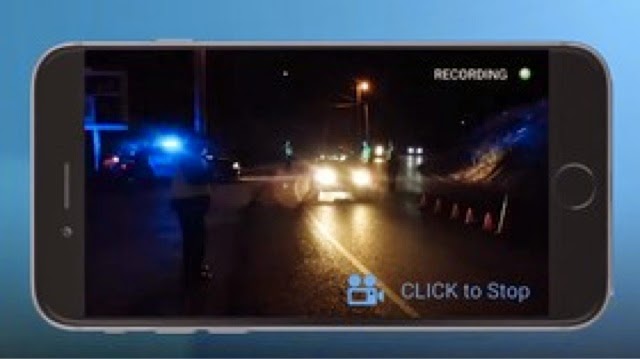
ACLU app lets you automatically send videos of police encounters


In a time when nearly everyone, regardless of income, seems to have a smartphone, the ACLU has come up with something that could help during your next encounter with an overzealous law enforcement officer: an instant reporting app.

Mobile Justice CA was created by the Southern California branch of the American Civil Liberties Union as a way to "keep law enforcement accountable and protect your rights."


Available for iOS and for Android, the free app allows users to instantly record and send a video of a police encounter to the ACLU.

Additionally, the app also allows you to turn on GPS tracking so that you can be notified if anyone else using the app near your location reports an incident. In light of recent demonstrations against police brutality, the app could be seen as essential equipment for some engaging in peaceful protests.

The app also includes a list of U.S. rights, giving the user an additional tool in potentially touchy situations involving police encounters, as well as free speech and student rights demonstrations.

It comes on the heels of recent high-profile police brutality cases that used bystander videos to show what really happened, such as the death of Walter Scoot in South Carolina, which resulted in the responsible officer being charged with murder.

That such an app is even necessary may itself serve as a commentary on U.S. law enforcement policies, which are still evolving every day. But, in the meantime, the ACLU's app is one tech-powered answer to the many questions swirling around recent, politically charged events in the U.S.

Have something to add to this story? Share it in the comments.


Innovative Ways the Autism Community Uses iPads

Boy-child-ipad-autism

The iPad has proven to be an especially useful communication tool for young people with autism. It provides a way to express themselves through words and images; it can be used to teach them about everyday scenarios and give them more independence. It's also far less bulky than some communication devices of the past.


Jonathan Izak's 12-year-old autistic brother inspired him to develop the AutisMate app for iPad. His brother, Oriel, is mostly nonverbal and used to struggle to communicate, sometimes throwing tantrums when he was unable to get his point across, Izak tellsMashable.

At 7 years old, Oriel had to wear a heavy communication device around his neck, which further set him apart from other children at school. Now, Oriel carries an iPad and uses the app his brother developed to communicate and learn new behaviors like how to act in specific social situations.

With AutisMate, parents or caretakers take and upload photos of their child's bedroom, the kitchen, his or her school to the app. When the app launches, the iPad's GPS will know where the user is and allows them to tap pictures of their surrounding environment. The child can tap the refrigerator, for instance, to express that he or she is hungry.

Izak says these visual tools for communication don't become a permanent crutch but rather promote speech and communication.

It's not uncommon for children with autism to be nonverbal and need the iPad to communicate. AutismSpeaks.org says it's estimated that 25% of people with autism are completely nonverbal.

Izak explains that, for someone with autism, the unknowns in life can be scary, so to prepare that person for the world, apps like AutisMate show scenes of how to do everyday things like go to a restaurant or the doctor's office.

Parents, caretakers and doctors knowearly intervention with autism is a key factor to increasing their child's likelihood of communicating, which is probably why most autism apps focus on children. iPad apps to help children with autism develop their communication skills are part of a rapidly growing market and have proved to be effective tools. Check out some of the apps we found and others recommended to us. Let us know if you know of any other useful apps for people with autism.

Photo courtesy of iStockphoto,UrsaHoogle


Advertisement